打开网页提示:500 Internal Privoxy Error 解决方法
说明:文章内容仅供预览,部分内容可能不全。下载后的文档,内容与下面显示的完全一致。下载之前请确认下面内容是否您想要的,是否完整无缺。
最近在使用SS上网打开网页的时候,浏览器显示英文提示:
500 Internal Privoxy Error
Privoxy encountered an error while processing your request:
Could not load template file no-server-data or one of its included components.
Please contact your proxy administrator.
If you are the proxy administrator, please put the required file(s)in the (confdir)/templates directory. The location of the (confdir) directory is specified in the main Privoxy config file. (It's typically the Privoxy install directory).
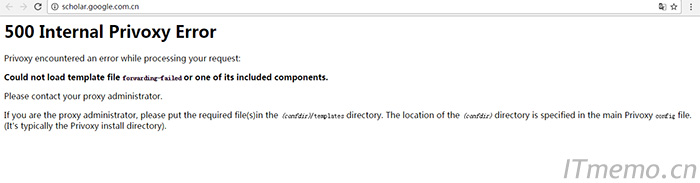
相信,很多网友都遇到过这样的错误提示导致无法访问国外网页吧?下面小编就给大家分享一些解决方法,希望能对大家有帮助!
方法步骤:
问题根源:电脑时间和网络时间不同步导致的
解决方法:同步电脑时间和网络时间
同步方法:
win7:点击右下角时间,点击“更改日期和时间设置”,点击“internet时间”,点击“更改设置”,勾选“与internet时间服务器同步”,点击立即更新
win10:(win10基本上默认同步的)
同步方法也更简单点,点击右下角时间,点击“日期和时间设置”,点击“立即同步”或打开“自动设置时间”,就可以了!
当然,有的是代理设置问题导致的,这个不同的代理软件,设置方法可能就不同了。若是自己架设的SS,可以尝试重启SS服务端,再用客户端软件连接,看看服务端日志显示情况,但是最起码你要检查服务端和客户端的时间是否一致!
正在阅读:
打开网页提示:500 Internal Privoxy Error 解决方法05-29
非常经典的读书名言:积财千万,无过读书08-23
初中作文600字写人(精选5篇)01-12
2020年河北唐山初级会计职称考试报名时间:2019年11月1日至30日03-14
[2018年山西中考政治题及答案]2018年广西桂林中考政治答案05-15
新加坡投资移民优势分析05-17
美,一种生活的姿态作文600字10-10
贵州2018年6月大学日语六级成绩查询时间及查分入口07-04
2021年福建省选调生选拔工作公告10-09
上一篇:IIS ASP 500错误解决方法
下一篇:linux查看系统信息命令大全
相关热搜
推荐文章
热门阅读