h3c端口批量加入vlan命令 华三批量配置端口vlan
说明:文章内容仅供预览,部分内容可能不全。下载后的文档,内容与下面显示的完全一致。下载之前请确认下面内容是否您想要的,是否完整无缺。
华为、华三H3C交换机如何将端口、接口多个批量加入Vlan?可能很多新手不知道在哪个配置模式视图下去操作,下面小编就给大家分享H3C交换机批量配置端口Vlan命令,帮助各位同学快速学习交换机入门。
方法步骤:
进入对应的Vlan 视图,输入以下命令:
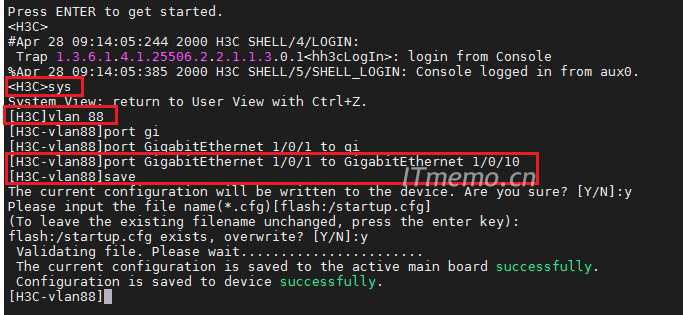
<H3C>system-view
[H3C]vlan 88
[H3C-vlan88]port GigabitEthernet 1/0/1 to GigabitEthernet 1/0/10
[H3C-vlan88]save
命令解析:
system-view:进入 系统视图 才有权限配置交换机,发生的变化和辨别方法就是:<H3C>由尖括号变为:[H3C] 中括号
vlan 88:进入Vlan 配置模式,进入Vlan 88,没有该Vlan 将自动创建Vlan 88
port GigabitEthernet 1/0/1 to GigabitEthernet 1/0/10:将交换机 千兆口1口至10口 加入批量加入 Vlan 88
save:保存配置,根据以下提示回答:Y
The current configuration will be written to the device. Are you sure? [Y/N]:y
Please input the file name(*.cfg)[flash:/startup.cfg]
(To leave the existing filename unchanged, press the enter key):
flash:/startup.cfg exists, overwrite? [Y/N]:y
 Validating file. Please wait.......................
 The current configuration is saved to the active main board successfully.
 Configuration is saved to device successfully.
配置过程如下图所示:
查看并验证我们交换机的:千兆口1至10口是否被加入Vlan 88,输入以下命令查看 Vlan下的接口
[H3C]display vlan 88
如下图所示:
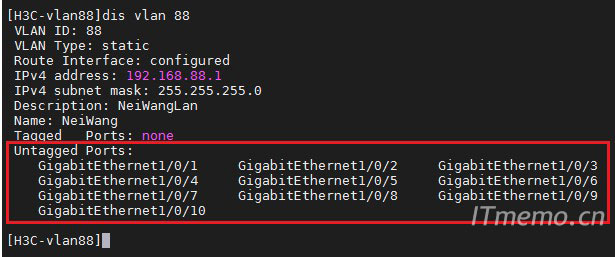
默认这些被批量加入Vlan 88 的端口/接口 为:access 类型,可以直接接:电脑这类网络终端设备。
相关热搜
推荐文章
热门阅读